PowerShell script to list sites that have a specified feature enabled
The following PowerShell script will enumerate all sites within a Site Collection and report on where a particular feature has been enabled using the Get-SPWeb cmdlet. In the example I am reporting on the SharePoint Server Enterprise Site Features feature and have excluded sites within the app domain.
To use the script just change the SiteCollection, DefinitionID and AppDomain variables
Add-PSSnapin "Microsoft.SharePoint.PowerShell"

$SiteCollection = "http://portal.lab.local"
$AppDomain = "*apps.lab.local*"
$DefinitionID = "0806d127-06e6-447a-980e-2e90b03101b8"

$Sites = Get-SPWeb -Site $SiteCollection -Limit All

$OutputArray = @()
$Properties = @{Site='Site'; URL='URL'; Status='Status'}
$NewObject = New-Object PSObject -Property $Properties

ForEach ($Site In $Sites | Where-Object Url -NotLike $AppDomain)
{
   If($Site.Features | Where-Object DefinitionID -Eq $DefinitionID)
   {
      $Properties = @{Site=$Site; URL=$Site.Url; Status="Enabled"}
      $NewObject = New-Object PSObject -Property $Properties
      $OutputArray += $NewObject
   }
   Else
   {
      $Properties = @{Site=$Site; URL=$Site.Url; Status="Disabled"}
      $NewObject = New-Object PSObject -Property $Properties
      $OutputArray += $NewObject
   }
}

$OutputArray | Format-Table -Property Site,Url,Status -AutoSize
The output will look something like this:
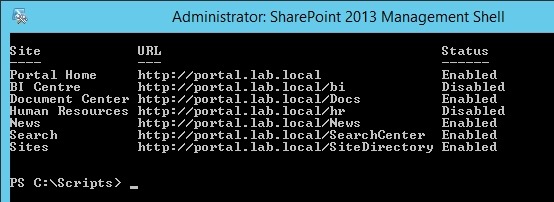
Note: You can use the Get-SPFeature cmdlet to display a list of features and their ID:
Get-SPFeature | Sort DisplayName | Format-Table -Property DisplayName,ID -AutoSize
![[BlogBookmark]](http://www.adventuresinsharepoint.co.uk/wp-content/plugins/bookmarkify/blogbookmark.png)
![[Blogsvine]](http://www.adventuresinsharepoint.co.uk/wp-content/plugins/bookmarkify/blogsvine.png)
![[del.icio.us]](http://www.adventuresinsharepoint.co.uk/wp-content/plugins/bookmarkify/delicious.png)
![[Digg]](http://www.adventuresinsharepoint.co.uk/wp-content/plugins/bookmarkify/digg.png)
![[Facebook]](http://www.adventuresinsharepoint.co.uk/wp-content/plugins/bookmarkify/facebook.png)
![[Furl]](http://www.adventuresinsharepoint.co.uk/wp-content/plugins/bookmarkify/furl.png)
![[Google]](http://www.adventuresinsharepoint.co.uk/wp-content/plugins/bookmarkify/google.png)
![[LinkedIn]](http://www.adventuresinsharepoint.co.uk/wp-content/plugins/bookmarkify/linkedin.png)
![[MySpace]](http://www.adventuresinsharepoint.co.uk/wp-content/plugins/bookmarkify/myspace.png)
![[Reddit]](http://www.adventuresinsharepoint.co.uk/wp-content/plugins/bookmarkify/reddit.png)
![[Slashdot]](http://www.adventuresinsharepoint.co.uk/wp-content/plugins/bookmarkify/slashdot.png)
![[StumbleUpon]](http://www.adventuresinsharepoint.co.uk/wp-content/plugins/bookmarkify/stumbleupon.png)
![[Twitter]](http://www.adventuresinsharepoint.co.uk/wp-content/plugins/bookmarkify/twitter.png)
![[Windows Live]](http://www.adventuresinsharepoint.co.uk/wp-content/plugins/bookmarkify/windowslive.png)
![[Yahoo!]](http://www.adventuresinsharepoint.co.uk/wp-content/plugins/bookmarkify/yahoo.png)
![[Email]](http://www.adventuresinsharepoint.co.uk/wp-content/plugins/bookmarkify/email.png)
 Loading ...
Very useful, thanks for sharing.
LEGEND! That is all.