SharePoint 2013 – Request an upgrade evaluation site collection
If you have a site collection that is in SharePoint 2010 mode you can create a temporary upgrade evaluation site collection using the Request-SPUpgradeEvaluationSite cmdlet. Here is an example of how this would look:
Request-SPUpgradeEvaluationSite -Identity http://portal.lab.local/sites/sp2010site
By default the timer job to create evaluation sites runs daily at 01:00 so I’ll kick it off manually using the Get-SPTimerJob and Start-SPTimerJob cmdlets:
Get-SPTimerJob job-create-upgrade-eval-sites | Start-SPTimerJob
I can see the request in the queue using the Get-SPSiteUpgradeSessionInfo cmdlet:
Get-SPSiteUpgradeSessionInfo –ContentDatabase <contentDBname> -ShowInProgress –ShowCompleted –ShowFailed

Once created I can view the evaluation site by appending “-eval” to the original URL (so http://portal.labl.local/sites/sp2010site becomes http://portal.labl.local/sites/sp2010site-eval):
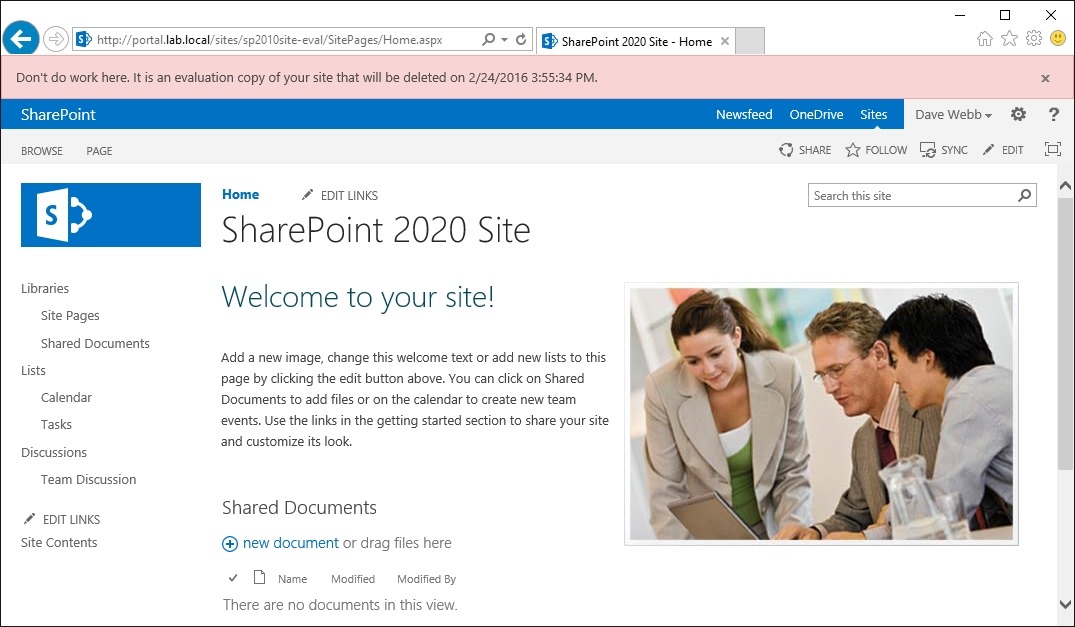
Once the evaluation site has been reviewed it can be upgraded for real using the Upgrade-SPSite cmdlet:
Upgrade-SPSite http://portal.lab.local/sites/sp2010site –VersionUpgrade
Note: The timer job that deletes the temporary upgrade evaluation site collections runs daily at 01:00
![[BlogBookmark]](http://www.adventuresinsharepoint.co.uk/wp-content/plugins/bookmarkify/blogbookmark.png)
![[Blogsvine]](http://www.adventuresinsharepoint.co.uk/wp-content/plugins/bookmarkify/blogsvine.png)
![[del.icio.us]](http://www.adventuresinsharepoint.co.uk/wp-content/plugins/bookmarkify/delicious.png)
![[Digg]](http://www.adventuresinsharepoint.co.uk/wp-content/plugins/bookmarkify/digg.png)
![[Facebook]](http://www.adventuresinsharepoint.co.uk/wp-content/plugins/bookmarkify/facebook.png)
![[Furl]](http://www.adventuresinsharepoint.co.uk/wp-content/plugins/bookmarkify/furl.png)
![[Google]](http://www.adventuresinsharepoint.co.uk/wp-content/plugins/bookmarkify/google.png)
![[LinkedIn]](http://www.adventuresinsharepoint.co.uk/wp-content/plugins/bookmarkify/linkedin.png)
![[MySpace]](http://www.adventuresinsharepoint.co.uk/wp-content/plugins/bookmarkify/myspace.png)
![[Reddit]](http://www.adventuresinsharepoint.co.uk/wp-content/plugins/bookmarkify/reddit.png)
![[Slashdot]](http://www.adventuresinsharepoint.co.uk/wp-content/plugins/bookmarkify/slashdot.png)
![[StumbleUpon]](http://www.adventuresinsharepoint.co.uk/wp-content/plugins/bookmarkify/stumbleupon.png)
![[Twitter]](http://www.adventuresinsharepoint.co.uk/wp-content/plugins/bookmarkify/twitter.png)
![[Windows Live]](http://www.adventuresinsharepoint.co.uk/wp-content/plugins/bookmarkify/windowslive.png)
![[Yahoo!]](http://www.adventuresinsharepoint.co.uk/wp-content/plugins/bookmarkify/yahoo.png)
![[Email]](http://www.adventuresinsharepoint.co.uk/wp-content/plugins/bookmarkify/email.png)
 Loading ...